Enterprise IT has moved away from the traditional on-premises model, driven by cloud adoption and remote work. While this has brought convenience and significantly improved productivity, it has also paved the way for increasingly sophisticated cyberattacks. For instance, if login credentials are leaked, anyone can impersonate legitimate users and access the enterprise network. So, you are constantly confronted with a fundamental security question: Is the user actually who he claims to be?
Since the beginning, passwords have been the primary checkpoints determining whether users can log in – they are the original single-factor authentication method; if someone entered a correct password, they were automatically deemed as the right user. The password standards have evolved over the years to prevent impersonators and unauthorized users from guessing or cracking them. However, passwords alone are not adequate today; they are not completely immune to failure – password reuse, credential theft, phishing, and brute-force attacks have rendered single-factor authentication inadequate.
To make it harder for attackers to impersonate legitimate users, modern enterprise security needs to strengthen identity assurance by requiring proofs of identity and legitimacy. This is where Multi-Factor Authentication (MFA) for enterprise security becomes essential.
This article explores how Multi-Factor Authentication (MFA) strengthens enterprise security. It explains MFA’s benefits, use cases, adaptive capabilities, and implementation challenges.
Why Passwords Are Not Enough
While passwords provide basic security, they are not proof of identity; even the strongest password does not prove who is really logging in. It only proves someone knows how to access something the right user is entitled to. The password grants exclusive access to the right person only when no one else knows it. But your password could potentially reach the wrong hands in many ways.
- You might have shared it carelessly or by mistake with someone and forgotten it.
- Your login credentials might have leaked onto the dark web, and a cybercriminal might have bought them.
- A bad actor could have obtained your credentials through brute-force or password-spraying attacks.
- You might have been a victim of a phishing attack.
This is precisely why you need multi-factor authentication. The difference between multi-factor authentication and password-only authentication models is the gap between knowing a password and proving real identity. You need to check whether the person knows the password and, at the same time, verify if they are the right person.
What is MFA, and How Does It Answer the Identity Question?
Multi-Factor Authentication (MFA) is a security method that involves multiple authentication factors to verify user identity. It provides access only after both the password and the user identity are verified, so only legitimate users can access corporate systems, cloud services, VPNs, and sensitive applications.
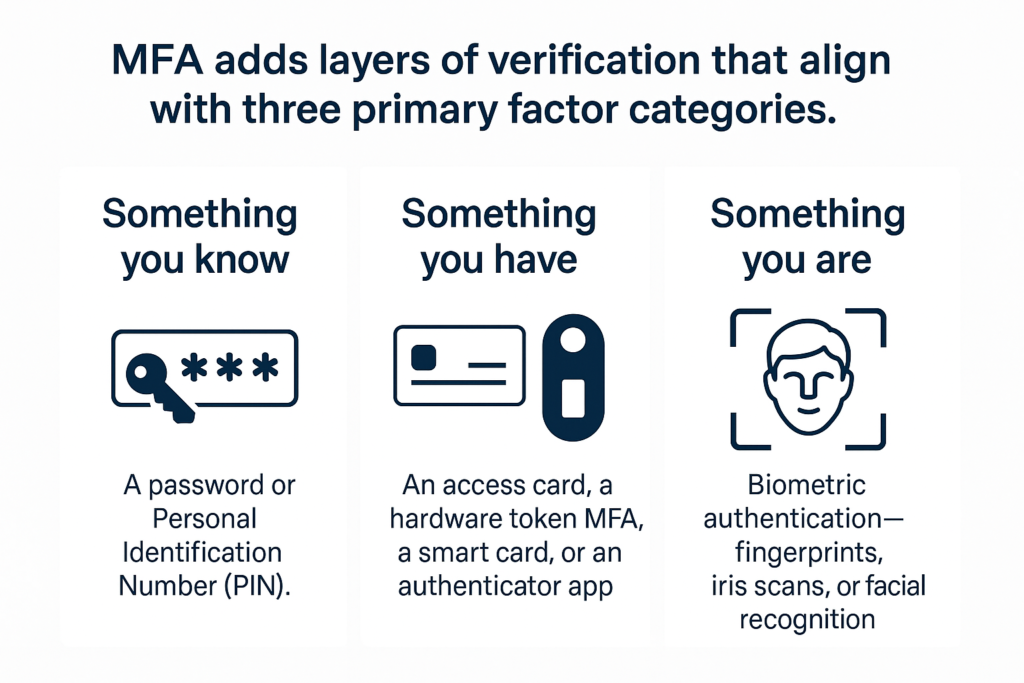
- Something you know: This refers to knowledge-based factors, such as a password or Personal Identification Number (PIN).
- Something you have: It could be an access card, a hardware token MFA, a smart card, or an authenticator app.
- Something you are: This covers inherence-based factors, such as biometric authentication – fingerprints, iris scans, or facial recognition.
Some security systems further combine these verification methods with behavioral signals, such as typing patterns and past user activity, and contextual signals, such as device reputation, location, and login time, to determine if a login is normal or suspicious.
Adaptive MFA: Asking for More Proof Only When Needed
Not all login attempts carry the same level of risk. But when the security system flags a login attempt as suspicious based on behavioral and contextual signals, it is deemed as high risk. In these circumstances, the system triggers risk-based authentication or adaptive MFA, requiring the user to present an additional factor for verification and prove their identity.
Adaptive MFA evaluates:
- Location
- Device trust level
- Login time
- Network risk
- User behavior patterns
Combining multiple factors to verify user identity increases the likelihood that the user logging in is the legitimate user, not an imposter. This makes security smarter, stronger, and less disruptive for genuine users.
Benefits of MFA for Business
Deploying MFA delivers mission-critical improvements for your business.
Multi-factor authentication involves verifying the identity of the user. So, MFA ties your login to a verified device, a validated biometric, or a controlled hardware token. Even if attackers can crack a password, impersonating the user becomes significantly more difficult, as they still cannot satisfy the second factor. As a result, you can reduce phishing with MFA.
Remote and hybrid working environments in enterprise settings increase risk, as employees need to access critical systems from home, coworking spaces, or public networks. MFA for remote work enforces identity verification before granting employees access, thereby reducing risk.
Cloud apps and infrastructure rely heavily on identity-based access. MFA for cloud security prevents unauthorized access to SaaS, IaaS, and PaaS environments.
Multifactor authentication is not just a luxury; it is highly recommended for industries governed by standards like PCI DSS, HIPAA, GDPR, and various government cybersecurity frameworks. MFA compliance security is fundamental for these organizations.
Enterprise Use Cases
MFA can be used to secure various enterprise systems, applications, and access points, including VPN connections, employee logins, privileged accounts, SaaS platforms, and cloud environments.
1. MFA for VPN Access
MFA secures remote network tunnels, authenticating employees before granting access to internal resources.
2. Identity and Access Management (IAM)
Combining MFA with IAM ensures that every critical login, privilege escalation, and sensitive transaction undergoes strict identity verification.
3. Privileged Accounts
MFA ensures that attackers, even if they get hold of login credentials, cannot exploit privileged accounts, and only the admins, developers, DevOps engineers, and database users handle high-risk systems.
4. Customer and Vendor Portals
MFA significantly reduces the risks involved in enabling third-party access by vendors and customers, which represents one of the biggest enterprise attack vectors.
MFA Implementation Challenges
While MFA implementation bolsters enterprise security, it can pose numerous challenges, occasionally prevent legitimate logins due to factors such as hardware token loss, and cause inconveniences for users. Challenges include:
- Resistance from users against widespread adoption due to perceived inconvenience
- Lockouts and prevention of legitimate logins due to Hardware token loss
- Insecure backup methods – like SMS codes that are vulnerable to SIM swapping
- Incompatibility and difficulty in integrating with legacy systems
- Poor security due to over-reliance on a single MFA factor – for instance, an attacker can intercept SMS or port the user’s mobile number and obtain the authentication codes.
You can address these challenges by following the MFA best practices, such as offering multiple authentication options, enforcing strong recovery procedures, and integrating MFA seamlessly into IAM systems.
Final Thoughts – Validating Real Identity in a Zero-Trust World
The enterprise digital infrastructure heavily relies on cloud and remote work. It increases the challenge of verifying who is logging in using the credentials. Multifactor authentication verifies that a user is who they claim to be. With MFA, you can be far more certain that the right person is logging in.
While no authentication method is perfect, MFA closes the gap between the one extreme of blind password belief, where it is assumed anyone who logs in with the password is the right person, and the other extreme, where a user needs to constantly prove who they are. When MFA is combined with adaptive mechanisms, IAM systems, and cloud-native controls, it forms the backbone of MFA enterprise security. In today’s threat environment, MFA is not just a feature; it is a fundamental identity safeguard.
FAQs
1. What is enterprise MFA?
Enterprise MFA is a security method that requires multiple authentication factors to verify user identity. It ensures that only legitimate users can access corporate systems, cloud services, VPNs, and sensitive applications.
2. What are the 5 factors of MFA?
The five factors of MFA include knowledge, possession, inherence, location, and behavior. These factors provide layered identity assurance beyond traditional password-based authentication.
3. What are the three pillars of MFA?
The three pillars of multi-factor authentication are: something you know, something you have, and something you are. These three form the foundation of reliable multi-factor authentication.